Security and alarm systems, Riga

PURON: a website with a price calculator and a system for sales and installation

A website that prices the alarm kit and issues the estimate on its own, and one system for the staff: enquiry → estimate → payment → contract → installation → site record.

pages on the site indexed by Google
1,377
items in the estimate catalogue
182
roles, from manager to accountant
8
PURON: a website with a price calculator and a system for sales and installation

The task

SIA PURON installs Ajax alarms, runs a 24/7 monitoring centre and fits video surveillance. The task had two parts. First, a website where customers put together a kit for their property, see the price and get an estimate straight away. Second, one system for the office, technicians and the monitoring centre, where an enquiry goes all the way to a site record.

Eight roles work in the system, each with its own access: administrator, director, manager, technical director, technician, monitoring operator, head of monitoring and accountant.

What we built

01

Price calculator on the website

Seven steps: property, existing security, address, rooms, kit, contact details and offer. The customer changes the device colour, adds extra protection or picks “I’ll install it myself”, and the price updates at once — together with the monthly fee, which depends on the city.
The kit step: device colour, installation and extra protection, with the price on the right
The last step: one-off and monthly price and a “Download estimate PDF” button
02

Estimate PDF straight from the website

The calculator produces a “Komercpiedāvājums” (commercial offer) PDF laid out exactly like the company’s Excel estimate sheet. The customer views it in a window on the site and downloads it.

The estimate PDF in the preview window; bank details blurred

Screens show demo data

03

Enquiries and “Today” for the office

Enquiries from the website land in the admin panel. Each has an eight-step chain: call, site visit, estimate, payment, installation plan, contract, installation and act. On the “Today” screen the manager sees whom to call, who needs an estimate and which contract is due.

Customer list with statuses: new, estimate, payment, installation, done
An enquiry card: the eight-step chain, payment, contract and document pack

Screens show demo data

04

Estimate builder

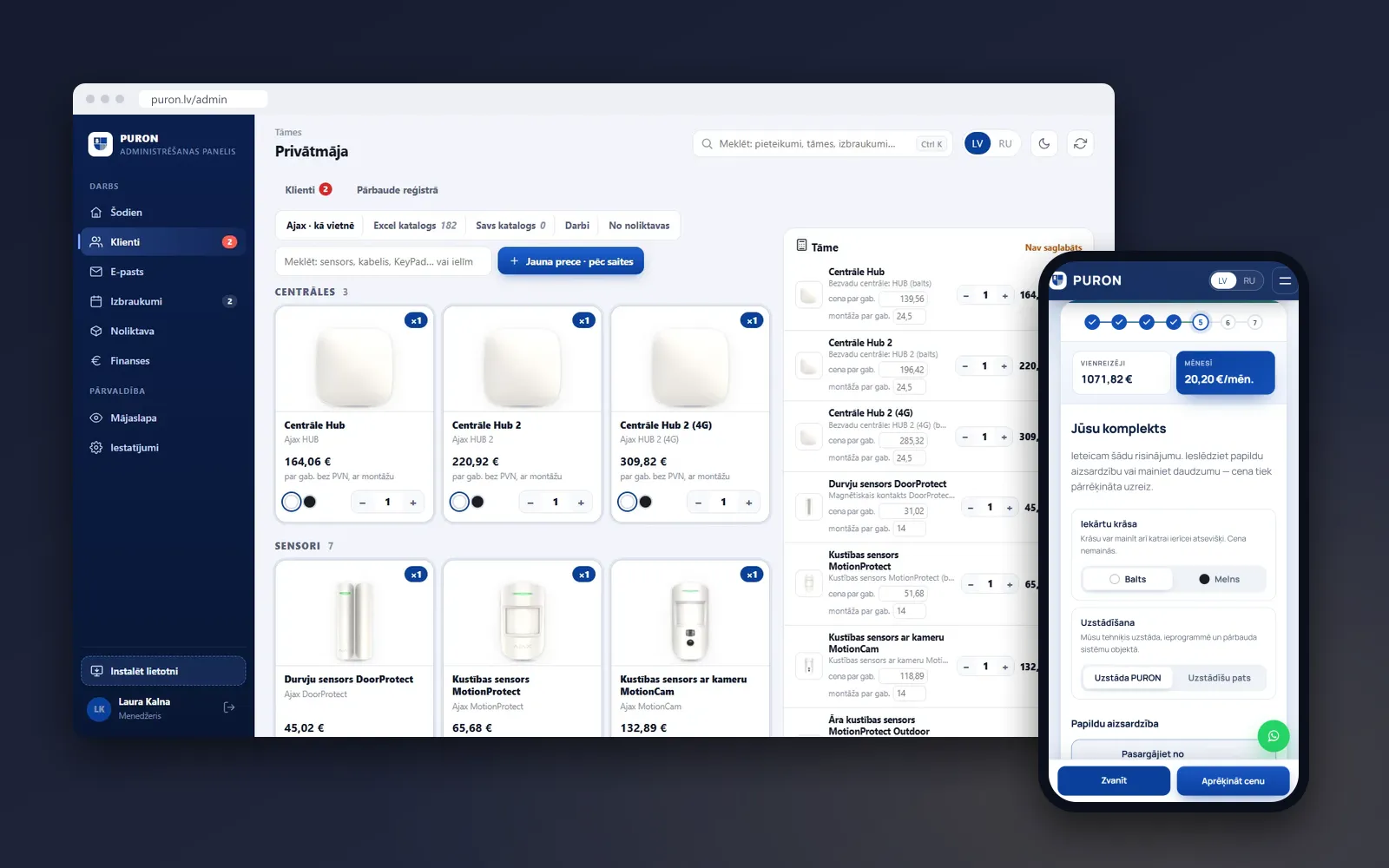
The manager builds the estimate from Ajax devices (the same as on the website), a 182-item Excel catalogue, the company’s own catalogue, labour and warehouse stock. The estimate on the right updates with every click.

Ajax devices as on the website, the estimate on the right
The Excel catalogue: 182 items with descriptions and prices

Screens show demo data

05

Site visits and the technician’s phone

The technical director plans visits by week or as a list, with a colour for each technician. On the phone a technician sees their jobs, opens the route in Waze or Google Maps, starts the job, ticks off the installed devices, adds photos and draws up an act the customer signs with a finger on the screen.

The week’s visit plan: installations, maintenance and call-outs by technician

Screens show demo data

Also in the system

  • The website in Latvian and Russian: 688 + 688 pages for services and cities, a map of 60 cities, address suggestions from the state address register
  • Purchasing and stock: supplier invoices are read on the device itself (pdf.js and Tesseract), barcodes, stocktaking
  • Contracts as PDFs, finance, email, customer reviews and a cookie-free visitor counter
  • Pipedrive: data starts in the admin panel and flows into the CRM — organisations, deals, visits as activities; deals sync back too
  • Security: password plus Google Authenticator, users by invitation only, passkeys and a sign-in log
  • “View as…” for the administrator: the system through the eyes of any role
  • Its own server, versioned releases with rollback, data backups every hour

Technologies and timeline

Technologies

  • HTML, CSS, JavaScript
  • Node.js 22
  • Docker: Caddy, nginx
  • pdf-lib
  • Tesseract.js
  • ZXing
  • Web Push
  • WebAuthn
  • TOTP
  • Pipedrive API v2
  • VZD
  • data.gov.lv

Timeline

  1. 23.09.2026

    Price calculator rebuilt

  2. 04.10.2026

    First version of the admin panel

  3. 07.10.2026

    The new website goes live at puron.lv

  4. 15.10.2026

    Sign-in with Google Authenticator (2FA)

  5. 17–18.10.2026

    Roles and a review of their access

  6. 27–29.10.2026

    Stock and stocktaking

Result

  • The new website has been live at puron.lv since 7 October 2026 — in Latvian and Russian, with 1,377 addresses in the sitemap.xml.
  • Customers find out the price themselves and get a PDF estimate laid out like the company’s Excel estimate.
  • Enquiry, estimate, payment, contract, installation and act sit in one system with eight roles.
  • In the code: 29 admin modules and 71 automated check scripts. We keep developing the system in releases.

Want something similar? Free quote within 24 hours

Leave a phone number or email. We will get in touch, go through your process and send a written quote with the price and timeline within 24 hours.

We use your contact details only to reply to this request. Privacy policy